ARCHIVES Browser
OpenRep SYNOPSIS includes the OpenRep ARCHIVES project, allowing to read, study and browse the original homeopathic texts. The ARCHIVES can be accessed from OpenRep SYNOPSIS by clicking the  icon.
icon.
Bookcase
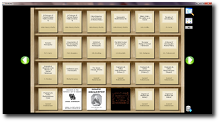 Your bookcase contains the list of all the books you own. To read a book, simply click on it. To read details about it, just hover with a mouse cursor over it and the details will be displayed as a hint text.
The left and right arrows allow you to browse for more books in your bookcase.
Among other features, you can perform search in all the books in your bookcase for a certain word or a selection of works (clicking the red dot next to the search icon will cancel the search results) and selecting categories you want to see.
Reading the books
 Clicking on a book in the bookshelf will display the contents of the book in the browser.
The basic view offers the book page, which can be scrolled with a mouse. To see the next page, press the LEFT key. To see the precious page, press the RIGHT key.
To access the menu, move the mouse towards the top of the screen and the menu with all the buttons will appear.
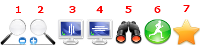
- 1. Zoom Out button will decrease the zoom.
- 2. Zoom In button will increase the zoom.
- 3. Fit to Height button will fit the screen to the height of your screen.
- 4. Fit to Width button will fit the screen to the width of your screen.
- 5. Search button will perform a search within this book.
- 6. AutoRead button will allow the page to scroll automaticall so that you do not have to turn the pages when reading.
- 7. Bookmark button allows creating bookmarks (highlighting areas of text and adding your own comments to them).